🖼️ Image Resizer Tool
Apni photo ki dimensions badlein aur gallery mein save karein
Select Image File
JPG, PNG, WEBP Support
image.jpg
0 KBSuccess! Resized
Aapki nayi image taiyar hai.
In today’s digital world, images play a vital role in communication, marketing, social media, and website design. However, managing image sizes can often become a time-consuming task, especially when dealing with multiple files. Resizing images one by one is not only slow but also inefficient. To solve this problem, we have created a powerful and easy-to-use Bulk Image Resizer that allows users to resize multiple images at once quickly and efficiently.
Image resizing is important for many reasons. Large image files can slow down websites, take up excessive storage space, and become difficult to upload on various platforms. Many websites, social media platforms, and online tools also require images to meet specific size requirements. With a bulk resize tool, users can adjust the dimensions of multiple images in just a few clicks without losing quality.
Our Bulk Image Resizer is designed with simplicity and convenience in mind. The tool works directly in your web browser, so there is no need to install any software. Users simply upload multiple images, choose the desired size or dimensions, and the tool processes all files instantly. This makes it ideal for beginners as well as professionals who need quick results.
One of the biggest advantages of this tool is time efficiency. Instead of resizing each image individually, users can resize hundreds of images simultaneously. This feature is especially helpful for photographers, content creators, eCommerce sellers, designers, and digital marketers who regularly handle large collections of images.
Quality preservation is another important benefit. Many resizing tools reduce image clarity or distort proportions. Our Bulk Image Resizer maintains high image quality while resizing. Users can choose to keep the original aspect ratio to prevent stretching or distortion, ensuring that images remain clear and visually appealing.
The tool also offers flexible resizing options. Users can resize images by setting custom width and height values, choosing percentage-based resizing, or selecting preset sizes suitable for social media platforms, websites, or printing. This flexibility makes it suitable for a wide range of use cases.
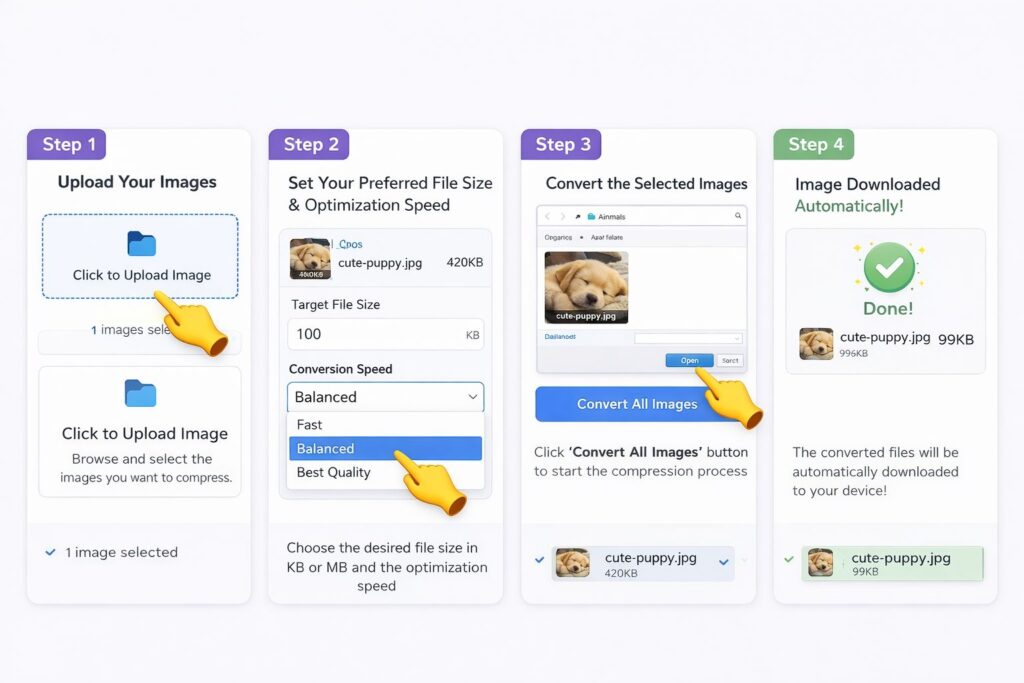
Using the Bulk Image Resizer is very simple. First, upload multiple images at once. Next, select the desired resizing settings. Then click the resize button, and within seconds, all resized images will be ready for download. The tool works smoothly on desktops, tablets, and mobile devices.
Security and privacy are also important considerations. Our tool processes files securely and does not permanently store uploaded images. This ensures that user data remains safe and confidential during the resizing process.
This tool is extremely useful for many practical applications. Website owners can optimize images for faster page loading. Social media managers can prepare images for platform requirements. Online sellers can resize product photos quickly. Even individuals can use the tool to organize and manage personal image collections.
In conclusion, our Bulk Image Resizer is a fast, reliable, and user-friendly solution for resizing multiple images at once. It saves time, maintains image quality, and simplifies digital image management. Whether you are a professional or a casual user, this tool provides an efficient way to handle bulk image resizing tasks with ease.